




Introduction
Do you know how many IT projects fail? The percentage revolves around 15%. These failures are not the results of the same major fault. These failures are due to simple reasons, such as time management, lack of proper software development planning, unspecified requirements, wrong estimation of the budget.
These problems can easily be sighted while you are working on software development projects. It should be kept in mind that if you offer custom programming services, failure is the last thing you would like to have.
We are not saying that failure is not acceptable; we are just emphasizing that you cannot take any half-hearted measures while offering services.
Why Do Small Businesses Need Software?
In the present market, where everything is controlled digitally, you cannot think of functioning properly without the support software tools. If you can integrate the right software into your business, it can become a small window towards your success.
Here are a few reasons why businesses want to develop software for their operations.
- The software can enhance the customer experience.
- With the new software at your disposal, you are open to new marketing channels.
- Using the software tools, you can automate several business operations.
In fact, most businesses use software tools at every level of business operation. This keeps the confusion away from the organization and keeps you away from unnecessary headaches.
Stages Of software Development Life Cycle
Having thoroughly planned stages of the software development life cycle ensures that you do not make any mistakes in the software development process.
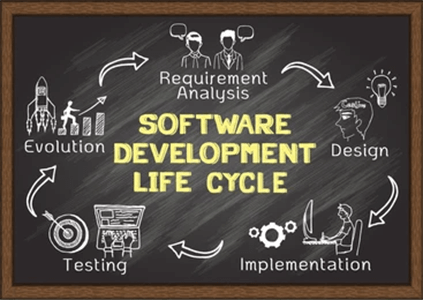
Stage 1: Analyzing The Situation
When a customer comes with a software development project, you must analyze the whole situation from the point of view of your customers and formulate a plan.
Add the following to your planning checklist:
- Alignment – You must ensure that the goals of the company and software align together.
- Resource Availability – Before taking on any software development projects, check your team and ensure that you have the right members to do the job. If your internal team lacks specialized expertise or capacity, Hire Remote Developers from experienced talent pools to fill skill gaps without the delays of traditional recruitment.
- Project Scheduling – Look at your schedule and see whether the current project will fit the goals of your company and other tasks.
Stage 2: Identifying Your Requirements
The next step is identifying the requirements of the projects. Whether you are building a new application or software, you need to analyze your requirements.
To better understand your requirements ask yourself the following questions:
- Who are the consumers?
- What kind of solution will this software offer?
- What kind of data input and output will it need?
- How will security and privacy need to be handled?
Once your team has all the answers, your development team can start spanning all the requirements.
Stage 3: Designing A Prototype
Designing a prototype before the actual software is necessary. It gives you an idea of the challenges you will be facing while creating the main product. Although this stage is unnecessary for all the products, you must certainly go for it if you have the budget.
Stage 4: Software Development
This is the stage where your team will decide on a software development method. This is where things get tricky. There is the waterfall method, agile method, and more to develop software. Depending on your deadline, quality, you can choose any one method. The bottom line will be to create software that is clean and efficient with its work.
Stage 5: Testing
Once the development process is complete, the next important thing is to test the software. As the testing phase is a long one, you need to ensure that you are not letting any buggy software in the market or actual customers.
Final Thoughts
As technology is evolving at a faster pace, it is driving software companies to do the same. Hence, it becomes important that every software developed is tested thoroughly. With the help of the steps we have just mentioned above, you will be able to create high-quality software.
